
DESIGN PARTNER BETA
HELP SHAPE THE NEXT STEP TOWARD ZERO TRUST.
TPZ is accepting a limited number of Design Partners for a 12-week Beta. You’ll start with read-only Microsoft Entra visibility and work directly with our team to connect more of your environment and validate a governed path from identifying risk to safely taking action.
START WITH MICROSOFT ENTRA
See identity, access, risk, activity, roles, and policy context from Day 1.
ADD MORE CONTEXT
Build two mutually agreed integrations during the Beta, subject to technical feasibility and engineering review.
PROGRESS TO GOVERNED ACTION
Validate recommendations, simulation, approval, verified execution, evidence, and recovery.
Participation is limited so each Design Partner can work directly with the TPZ team.
HOW THE DESIGN PARTNER BETA WORKS
FROM READ-ONLY VISIBILITY TO GOVERNED PRODUCTION ACTION.

01
START
Begin with a working
TPZ baseline.
TPZ begins with read-only Microsoft Entra access so your team can review identity, access, risk, activity, roles, and policy context from Day 1.
02
CONNECT
Bring more of your environment into context.
TPZ and your team select two mutually agreed integrations, subject to technical review, and connect the identity, access, policy, and configuration data needed for the Beta.
03
GOVERN
Decide what should happen before anything changes.
TPZ introduces Guided Remediation with simulation, review, approval, and evidence. Live actions progress only after the required sandbox, security, and authorization checks are complete.
An authorized administrator can approve a defined action in your Microsoft Entra production environment. TPZ verifies the result, records what happened, and maintains a governed recovery path.
04
VALIDATE
Validate a controlled action in production.
Production access is never assumed. It is enabled only after TPZ and the Design Partner complete the required technical, security, sandbox, and authorization gates.
AVAILABLE ON DAY 1
SEE WHAT EXISTS TODAY.
Design Partners begin with the current TPZ product on Day 1. TPZ connects read-only to Microsoft Entra so your team can review identity, access, risk, activity, and policy context before the Beta expands into additional integrations and governed action.
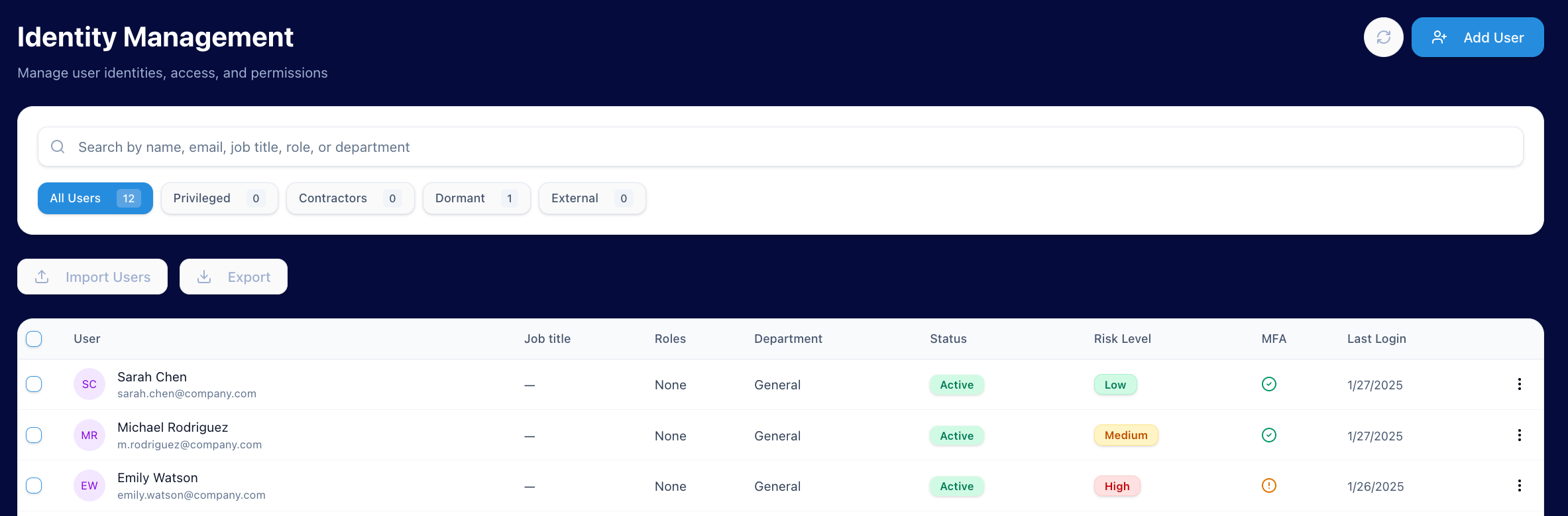
See users, account status, roles, MFA context, recent activity, and identity risk in one view.
01
IDENTITY & ACCESS OVERVIEW
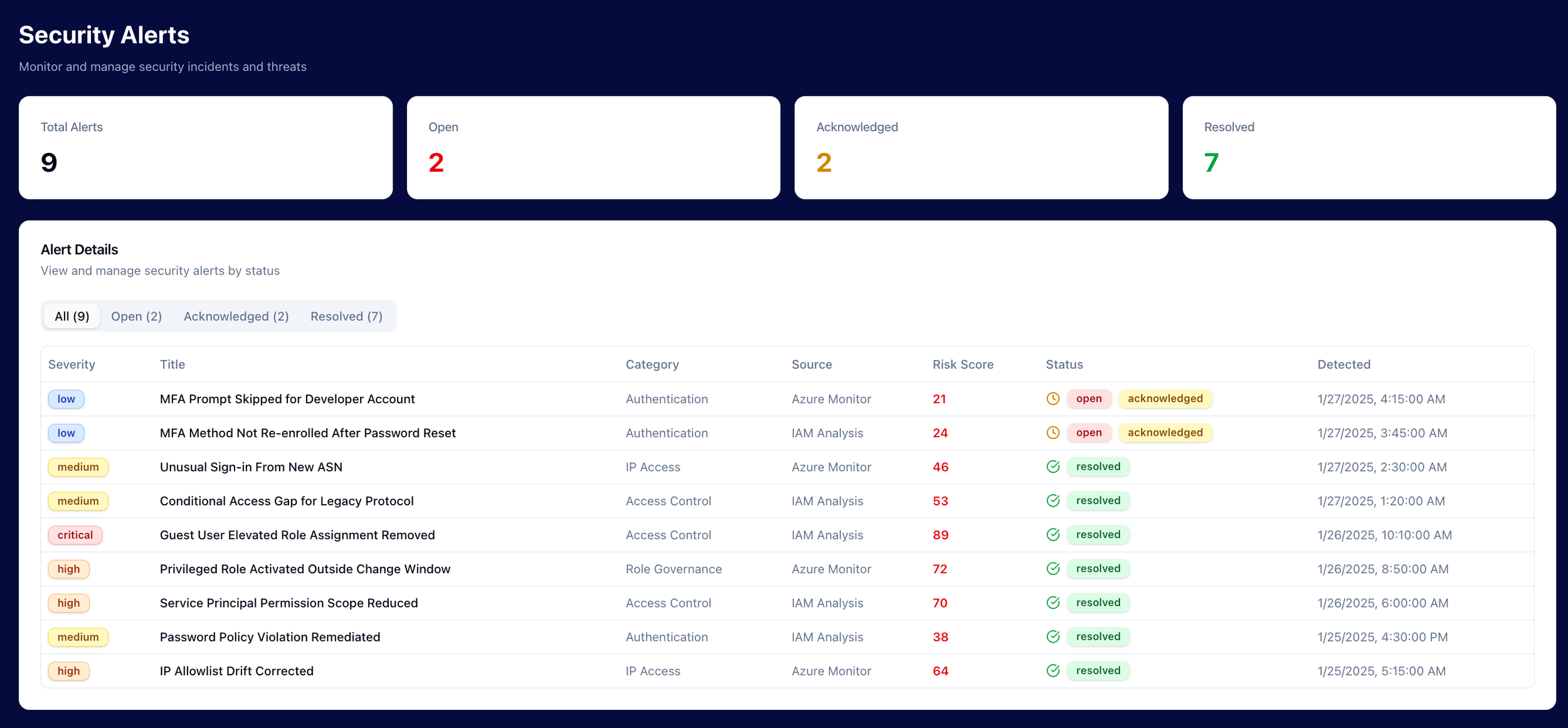
Surface identity and access conditions that may need investigation, with the activity and risk context needed to understand why.
02
RISK & ACTIVITY
03
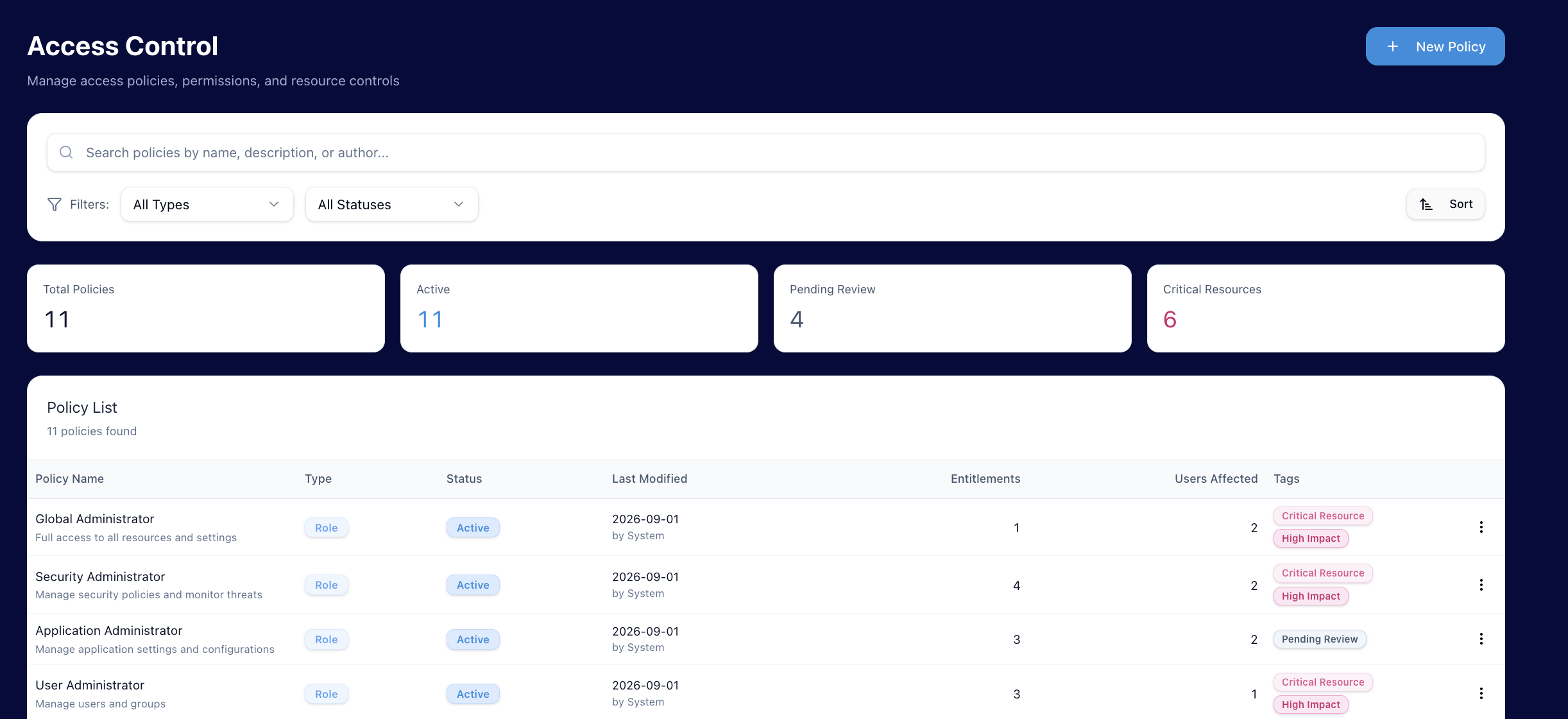
Policy & Access Context
Review Microsoft Entra policy and access context to understand how access is configured and where additional review may be needed.
DESIGN PARTNER PARTICIPATION
WHAT TPZ BRINGS. WHAT WE ASK FROM YOU.
WHAT TPZ PROVIDES:

Access to TPZ throughout the 12-week Beta
Two mutually agreed integrations, subject to technical feasibility and engineering review
Access to established TPZ integrations available during the program
Direct collaboration with our product and engineering team
Guided Remediation with simulation, approval, verification, evidence, and recovery
A final outcomes and commercial review at the end of the program
WHAT WE ASK FROM DESIGN PARTNERS
Microsoft Entra and a real identity or access problem to work through
A named internal champion and access to the administrators needed for setup and testing
Agreed read-only access to the systems included in the Beta
Regular participation, candid feedback, and timely responses to blocking requests
Willingness to progress toward controlled production validation once the required gates are met
You bring the environment, real workflows, and feedback. We bring TPZ and work alongside you to build and validate what comes next.
BETA SAFETY BOUNDARIES
TPZ starts by observing your environment, not changing it. Production capability is introduced only after the required testing, security, and authorization gates are complete, and your team remains in control of what is allowed to happen.
CONTROLLED BY DESIGN.

READ-ONLY FROM DAY ONE
We start by observing, not changing.
TPZ initially connects read-only to Microsoft Entra and the other agreed systems so your team can review the environment before any production action is considered.
PEOPLE STAY IN CONTROL
Production actions require explicit approval.
TPZ can recommend and simulate an action, but it cannot move into production without an authorized person approving a defined action within the permissions and boundaries established for the Beta.
SANDBOX BEFORE PRODUCTION
After an approved action runs, TPZ verifies the provider state, records what happened, and maintains a governed recovery path.
Live action has to earn its way into production.
Before production capability is enabled, TPZ and the Design Partner complete the required simulation, sandbox testing, security checks, and authorization steps. Approved production actions are limited to defined operations and verified after execution.
DESIGN PARTNER FIT
WHO SHOULD APPLY?
We’re primarily looking for growing financial-services organizations, with room for a small number of strategic partners that can help us validate an important use case or market.
Microsoft Entra is part of your environment
You have a real identity or access problem to work through
Relevant security and access context lives across more than one system
You have applications that could benefit from being connected to TPZ
YOUR ENVIRONMENT
YOUR TEAM
You can name an internal champion for the program
The appropriate administrators can support onboarding and validation
Your team can provide suitable test identities or accounts
You can participate in regular working sessions throughout the Beta
You are willing to share candid feedback about what is and is not useful
You are comfortable working closely with an early product team
You understand that not every feature request will become part of the roadmap
You are willing to progress toward a controlled production action once the required safety gates are met

YOUR MINDSET

The strongest fit is a team with a real identity or access problem, the people needed to work through it, and an interest in helping shape a more practical path toward Zero Trust.
We keep the program intentionally small so each Design Partner can work directly with the TPZ team. Not every applicant will be accepted.
AT THE END OF 12 WEEKS
PROVE THE VALUE. REVIEW THE OUTCOME. DECIDE WHAT COMES NEXT.
01 - PROVE GOVERNED ACTION
Complete the production milestone.
02 - REVIEW THE OUTCOME
Look at what changed.
CONTINUE WITH TPZ
Decide whether the value is worth continuing.
The Design Partner Beta and any post-Beta TPZ subscription are separate agreements. Participation does not create an obligation to purchase.
READY TO HELP SHAPE WHAT COMES NEXT?
Apply to see if the 12-week Design Partner Beta is a fit for your environment, priorities, and team.
Have questions first? Visit the FAQ →